Guides for this product
River City 20″ Spectrum Foil Heat Transfer Vinyl
River City Supply
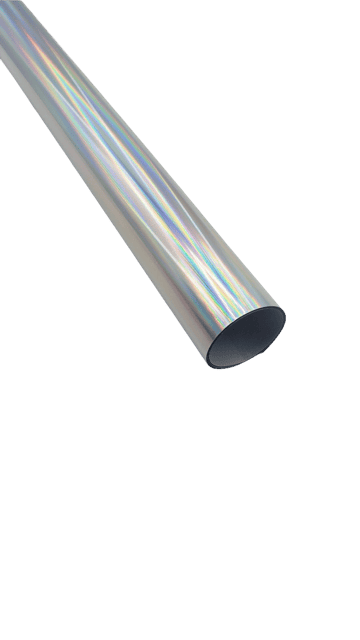




River City 20″ Spectrum foil heat transfer vinyl is a metallic HTV in the Color-Shift & Specialty group. It cuts, weeds and presses like standard HTV, and it needs no separate foil or adhesive.
$12.00
Description
River City 20″ Spectrum Foil Heat Transfer Vinyl
Metallic foil HTV, 20″ wide, that cuts, weeds and presses like standard HTV
Why Print Shops and Crafters Use It
Spectrum foil heat transfer vinyl in one layer
The vinyl is self-contained, so you don't need a separate foil or adhesive. Design, cut, weed, press and peel.
Cuts and weeds like standard HTV
It cuts, weeds and presses like standard HTV. The product page lists cutter settings for Cricut, Silhouette, Brother ScanNCut, Roland, Graphtec and other plotter families.
20″ wide roll
The 20″ width gives you room for larger designs.
Cotton, blends and polyester
It adheres to cotton, cotton blends and polyester. The page names shirts, totes and hats as uses.
Cutting Spectrum Foil HTV
Mirror the design
Flip the design horizontally before cutting, because the vinyl is applied face-down.
Load shiny side down
Load the vinyl with the shiny (foil) side down and the adhesive side facing up.
Cut through the vinyl, not the carrier
The machine should cut through the vinyl and leave the carrier sheet intact. Always run a test cut before cutting your designs.
Settings vary by machine
Settings may vary with blade condition and the age of the machine.
Good to Know
Is this Siser vinyl?
No. River City lists it as its own house-brand foil HTV, not Siser.
Do I need a separate foil or adhesive?
No. The listing describes the vinyl as self-contained, with no separate foil adhesive.
Recommended Cutter Settings
| Cutter | Blade / Settings |
|---|---|
| Cricut | Blade: Standard · Setting: Iron-on |
| Silhouette Cameo | Blade: Standard, 2 · Material: Heat Transfer, Smooth · Speed: 8 · Force: 4 |
| Brother ScanNCut | Blade: Standard, 2 · Cut Speed: 1 · Cut Pressure: 3 |
| Roland GX/GS-24 | Blade: 45° · Gram Force: 80–90 · Offset: .250 · Speed: 30–50 cm/s |
| Graphtec | Blade: 45° · Force: 8–9 · Tool: CB09U+0 · Speed: 30 cm/s |
| MH, SC2, LP3, Titan 1 | Blade: 45°/60° · Gram Force: 85–90 · Speed: 300 mm/s · blade advancing varies |
| Titan 2 & 3 | Blade: 45°/60° · Gram Force: 65–70 · Speed: 300 mm/s · blade advancing varies |
Related Products & Resources
Questions about this product? Our team can help.
Technical Specifications
Technical Specifications
| Specification | Value |
|---|---|
| Brand | River City (house brand, not Siser) |
| Product | Foil / metallic heat transfer vinyl (HTV) |
| Width | 20 inches |
| Color | Spectrum (Color-Shift & Specialty) |
| Finish | Metallic |
| Adheres to | Cotton, cotton blends, polyester |
| Application | Cuts, weeds & presses like standard HTV |
| Adhesive | Self-contained, no separate foil adhesive |
| Compatible cutters | Cricut, Silhouette, Brother, Roland, Graphtec & more |
Technical Sheets / Safety Data Sheets / Documents
FREQUENTLY ASKED QUESTIONS
Frequently Asked Questions
Is Spectrum Foil HTV Siser vinyl?
No. It is River City's own house-brand foil HTV, not Siser.
What iron settings should I use?
By iron: Cotton/Linen setting, firm pressure, 10–15 seconds per section.
Which side goes down in the cutter?
Mirror the design and load the vinyl with the shiny (foil) side down and the adhesive side up.
What fabrics does it adhere to?
Cotton, cotton blends and polyester.
Reviews
Only logged in customers who have purchased this product may leave a review.



Reviews